This post has interactive demos embedded. They work best on a desktop browser with keyboard and mouse.
On a VR project of mine, the UI was hand-based: buttons placed freely in space. You reached out and touched the one you wanted. Pure proximity. When controller support got added later, the same UI suddenly needed to work with a thumbstick and D-pad — press right, focus moves to the button on the right.
The trouble is that a proximity UI doesn’t have a notion of adjacency. There’s no grid, no list, nothing in the layout that says “this button is to the right of that one.” Standard UI frameworks compute directional navigation from rect transforms in 2D screen space, which doesn’t apply here. I needed to answer the question at runtime, from whatever positions the UI happened to have.
The hand-based version was already running a k-d tree under the hood — every frame, find the nearest button to the fingertip. When the directional question showed up, I didn’t want to spin up a separate index alongside it just to answer a related question on the same set of points. The real question was whether the existing tree could answer the directional query too.
Nearest Neighbor: A Quick Refresher
I’ll assume you already know what a k-d tree is and how nearest-neighbor search works on one. This section is a quick refresher to fix the vocabulary for the next part, not a tutorial — feel free to skim.
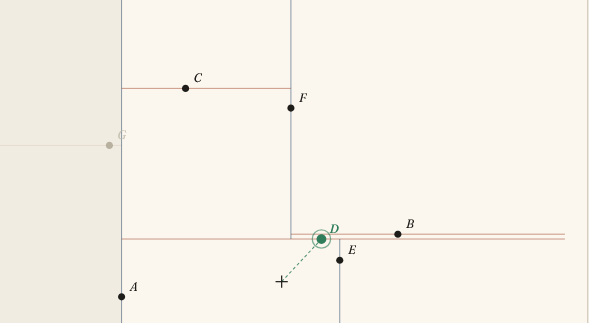
A k-d tree carves the plane into nested rectangles — one rectangle per subtree, recursively split along alternating axes. Searches are fast because the tree can dismiss whole rectangles without looking inside them: if the nearest edge of a rectangle is already farther than your current best, nothing inside it can beat that, so the whole subtree is skipped. A nearest-neighbor query descends toward its answer, then unwinds checking siblings; most siblings get dismissed by this rule and never touched.
The demo above is just to make that pruning visible. Move the cursor; the green letter is the nearest point. The dimmed letters are the ones the algorithm never visited; the shaded rectangles are the bounding regions it dismissed. With 8 points, a typical query visits 3 or 4 nodes — most of the tree never gets touched.
Adding a Direction
Directional navigation isn’t quite “nearest point.” The player has a focused element, presses RIGHT, and expects to land on the nearest element that’s actually to the right of the current one.
First, what does “to the right” even mean for an arbitrary scatter of points? Something is to the right of you if it’s more rightward than it is up or down — its horizontal offset from you exceeds its vertical offset. Picture standing at the focused element and looking right: you see a wedge of stuff that qualifies. That wedge is a 90° cone with its apex at you.1 A point qualifies if it lands in that wedge (and isn’t the focused element itself); if nothing qualifies, focus stays put.
Brute force scans every element, filters by the cone, takes the closest. But the tree is already in the business of dismissing whole rectangles without looking inside — it skips any subtree whose nearest edge is too far. We just need a second reason for it to skip: the subtree’s rectangle doesn’t reach into the cone.
Concretely, two checks slot in. At each node, before promoting its point to “new best,” require that the point is inside the cone. At each descent, before recursing into a child subtree, require that the subtree’s rectangle could intersect the cone — if not, skip it. The second check is where the speedup comes from. It composes cleanly with the standard distance prune: a subtree is skipped if either check rules it out, since each fires for independent reasons.
The point test is two comparisons that translate “more rightward than up-or-down” directly. For RIGHT, a point at offset (dx, dy) from the apex qualifies iff dx > 0 (it’s actually rightward at all) and |dy| < dx (its vertical offset is smaller than its rightward one):
function pointInCone(P, S, dir) {
  const dx = P[0] - S[0];
  const dy = P[1] - S[1];
  switch (dir) {
    case 'RIGHT': return dx > 0 && Math.abs(dy) <  dx;
    case 'LEFT':  return dx < 0 && Math.abs(dy) < -dx;
    case 'UP':    return dy < 0 && Math.abs(dx) < -dy;
    case 'DOWN':  return dy > 0 && Math.abs(dx) <  dy;
  }
}
The rectangle test is the same idea, one level up. A 90° axis-aligned cone is the intersection of two half-planes (for RIGHT: x > apex.x and |y - apex.y| < x - apex.x), so asking “could this rectangle poke into the cone?” reduces to checking the rectangle’s corners against those two half-planes. A handful of comparisons, symmetric across the four directions.
Pick a letter, press an arrow. The amber cone shows the search region; visited nodes stay dark, pruned ones dim out. Try pressing a direction where nothing exists — the cone gets drawn, the algorithm still runs, and you can see which subtrees got cone-pruned even when no point was found.
The cone prunes aggressively. Press RIGHT from a letter near the right edge: most of the tree is to your left, and “your left” is the entire wrong half of space for a RIGHT query — those subtrees can’t poke into the cone, so they’re dismissed before the descent even starts.
The General Pattern
The use case here is small enough that you could solve it in twenty lines without any tree at all — iterate every element, filter by cone, sort by distance. For a static screen with a handful of buttons, that’s totally fine. In my case, the tree was already there for the proximity query, so the question was never “should I build a k-d tree for this” — it was “can the one I have answer one more kind of question.” The answer was yes, with a small cone-test predicate slotted into the recursion.
A k-d tree, at heart, is just a way to skip over large regions of the plane without looking inside them. Nearest-neighbor exploits this by skipping any subtree whose nearest edge is farther than your current best. Directional search exploits it by skipping any subtree whose rectangle doesn’t reach into the cone. The tree itself is the same in both cases; only the rule for when to skip differs.
From there, the trick generalizes. Anything you can phrase as “this region of the plane can’t contain my answer” fits into the same recursion. Range queries, k-nearest, any cone — anything with both a point form (“is this the answer?”) and a region form (“could the answer be anywhere in here?”). Nearest-neighbor is just the simplest case.
*Source for both demos: github.com/CheukHoYun/navigable_kd_tree.