
What follows is an introduction to well-architected input design — the principles, the vocabulary, and the structure that holds up once a game grows past the tutorial stage.
If you’ve ever followed a Unity tutorial, you’ve probably written something like this:
void Update()
{
    if (Input.GetKeyDown(KeyCode.Space))
    {
        transform.position += Vector3.up * 5f;
    }
}
Press space, the cube goes up. The first time it works, it feels a little bit like magic — you’ve made a thing react to a button.
But the correct reaction to this code, once the celebration wears off, is “Sir, this is disgusting.”
I’m only half-joking. There are more than a dozen things wrong with this ten-line snippet. Let’s start with the most glaring — the one that, once you see it, will already start changing how you write input code.
One script, three jobs
Look at the last line: transform.position += Vector3.up * 5f. That isn’t input code — it’s physics code, sitting in the wrong file. The script was supposed to be listening for a keypress. Somewhere along the way, it also decided to override gravity, ignore collisions, and move the object instantly. None of those decisions are input’s to make.
It feels fine for the first fifteen minutes because the scene is empty — no ceiling to clip through, no “frozen” status effect, no cutscene taking control. The moment any of those exist, the rule for how the object moves is scattered across every script that listens for a keypress. Add a single “can’t move while frozen” check and you’ll have to find and patch each one. You will miss one.
Programmers have a name for the principle being broken here: separation of concerns. It’s a fancy phrase for a simple idea — each part of your code should have one clear job, and shouldn’t reach into someone else’s job.
The script collapses two distinct jobs into one. The first is figuring out what the player wants — translating the noisy stream of hardware events into clean intent. The second is figuring out what to do about it — whether the action is currently legal, how it interacts with the rest of the game, what it changes in the world. “The player wants to jump” is the natural boundary between the two. The rest of this post is an extended argument for treating that boundary seriously: first recognizing it exists, then building each side properly.
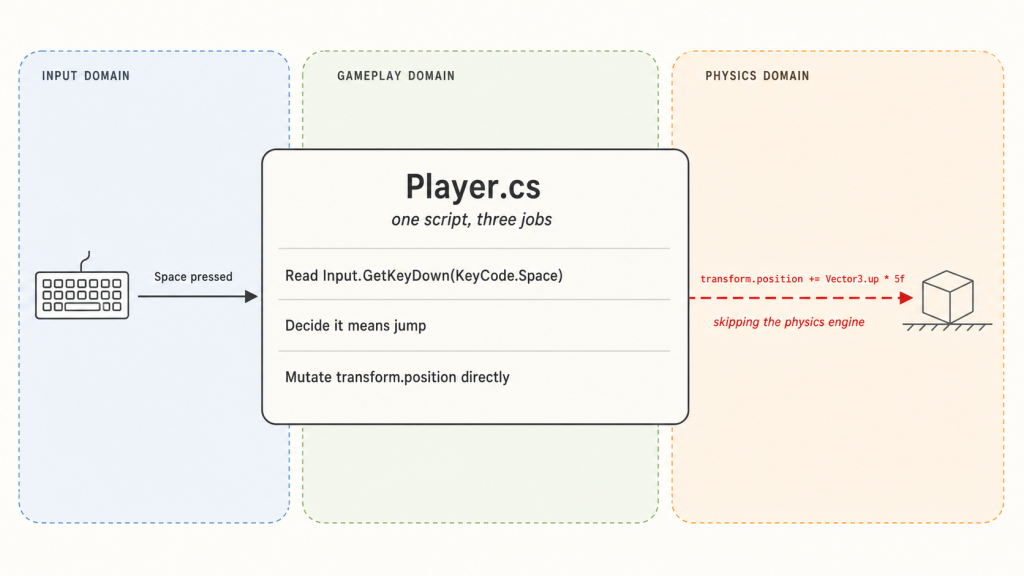
Let’s pull the two halves apart.
Pulling the halves apart
The fix is conceptually simple: don’t let the input handler decide what happens. Let it just report what the player did, and put the decision-making somewhere else.
Here’s a first attempt:
public class Player : MonoBehaviour
{
    private Rigidbody body;
    private bool isGrounded = true;
    private bool jumpRequested;

    void Awake() => body = GetComponent<Rigidbody>();

    // Input side: just reports what was pressed.
    void Update()
    {
        if (Input.GetKeyDown(KeyCode.Space))
            jumpRequested = true;
    }

    // Gameplay side: decides what to do about it.
    void FixedUpdate()
    {
        if (jumpRequested)
        {
            if (isGrounded)
            {
                body.AddForce(Vector3.up * 5f, ForceMode.VelocityChange);
                isGrounded = false;
            }
            jumpRequested = false;
        }
    }

    void OnCollisionEnter(Collision _) => isGrounded = true;
}
It’s still one script, but the two halves are now visibly doing different jobs. Update() reads the keyboard and writes a flag — that’s the upstream half, ending exactly at “the player wants to jump.” FixedUpdate() reads the flag, checks whether the action is currently legal, and — only if it is — applies the actual motion through the Rigidbody. That’s the downstream half. Walls, gravity, and friction all get a vote now, because we’re going through Unity’s physics engine instead of around it. Input proposes; gameplay disposes; physics executes. 1
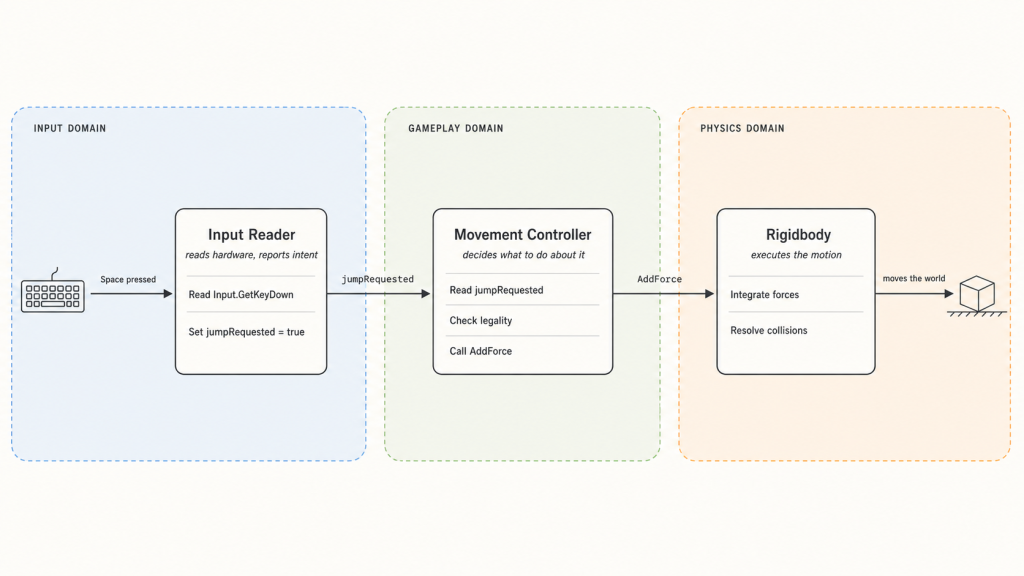
This is a real improvement. But it’s a tutorial-sized example — one action, one state — and those have a way of looking fine until you give them more to do.
Let’s give it more to do. Suppose the character also needs to crouch and attack:
// Input side
void Update()
{
    if (Input.GetKeyDown(KeyCode.Space))        jumpRequested = true;
    if (Input.GetKeyDown(KeyCode.LeftControl))  crouchRequested = true;
    if (Input.GetKeyDown(KeyCode.Mouse0))       attackRequested = true;
}

// Gameplay side
void FixedUpdate()
{
    if (jumpRequested)
    {
        if (isGrounded && !isCrouching && !isAttacking)
        {
            body.AddForce(Vector3.up * 5f, ForceMode.VelocityChange);
            isGrounded = false;
        }
        jumpRequested = false;
    }

    if (crouchRequested)
    {
        if (isGrounded && !isAttacking)
            isCrouching = true;
        crouchRequested = false;
    }

    if (attackRequested)
    {
        if (!isAttacking && !isStunned)
        {
            // play attack animation, queue damage, etc.
            isAttacking = true;
        }
        attackRequested = false;
    }
}
You haven’t built anything ambitious yet — three actions, a handful of flags — and already the gameplay-side code is turning into a wall of conditional checks. Each new behavior adds a request flag, a status flag, and a small thicket of “make sure none of the other things are happening” negations. Imagine this script with sprinting, blocking, and climbing folded in.
Something is wrong here. Not catastrophically — the code still works, and it’s already better than what we started with. But something’s off, and we haven’t named it yet.
The state machine you didn’t write
Look at that gameplay-side code again. Every if is checking a different combination of isGrounded, isCrouching, isAttacking, isStunned. Every block is trying to reconstruct the same question: “what is the character actually doing right now?”
The character has modes. Standing, jumping, crouching, attacking — programmers call these states, and a system that tracks which state we’re in and which transitions are allowed is a state machine. Our character already has one. It just lives nowhere — there’s no place in the code where you can read the list of states or the rules for moving between them. The state machine is implicit, smeared across a tangle of flags.
This is a common, painful trap, and I’ve written about it separately. For this post, one consequence is enough: with four booleans you can express sixteen combinations, but only a handful — standing, crouching, jumping, attacking — actually make sense. The rest are nonsense the language will happily let you reach. The only thing keeping the character out of them is your personal vigilance about every if you write. Sooner or later you forget, and a player T-poses mid-air because two if blocks disagreed about what was going on.
The fix, in one sentence: stop expressing the character’s mode as a pile of independent flags. Express it as a single named thing — an enum, or a sealed hierarchy of state classes — that can only hold one value at a time. The compiler then enforces what your ifs were failing to enforce by hand.
Here’s what that looks like in our code. We replace the pile of booleans with a single named state:
public enum CharacterState
{
    Standing,
    Crouching,
    Jumping,
    Attacking,
    Stunned,
}

private CharacterState state = CharacterState.Standing;

// Gameplay side, now state-driven instead of flag-driven:
void FixedUpdate()
{
    if (jumpRequested)
    {
        if (state == CharacterState.Standing)
        {
            body.AddForce(Vector3.up * 5f, ForceMode.VelocityChange);
            state = CharacterState.Jumping;
        }
        jumpRequested = false;
    }

    if (crouchRequested)
    {
        if (state == CharacterState.Standing)
            state = CharacterState.Crouching;
        crouchRequested = false;
    }

    if (attackRequested)
    {
        if (state == CharacterState.Standing || state == CharacterState.Crouching)
            state = CharacterState.Attacking;
        attackRequested = false;
    }
}
Drawn out, the state machine our code now describes looks like this:
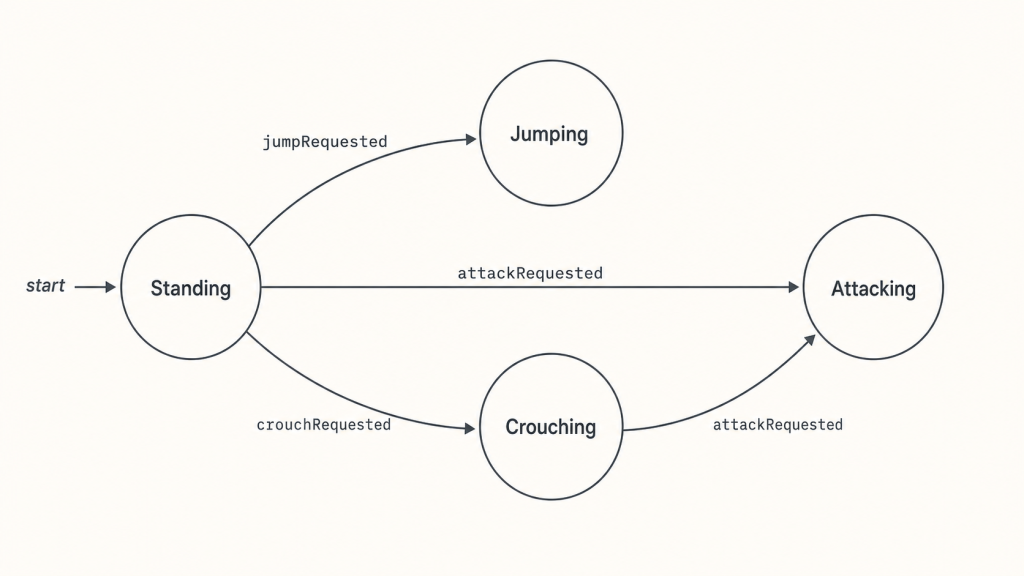
Three things changed. Each if now asks a single question — what state are we in? — instead of stacking flag checks. The list of valid states is visible at the top of the file, in the enum itself. And the entire bug class of “two contradictory flags somehow both true” is gone, because the type system cannot express two states at the same time. 2
That’s the gameplay half on solid ground. We promised both halves of the seam, and so far we’ve only touched one.
The other half
Take another look at our cleaned-up code — but this time look at the input side. The gameplay side got a state machine, an enum, a clean if per request. The input side is still doing what it was on day one:
void Update()
{
    if (Input.GetKeyDown(KeyCode.Space))        jumpRequested = true;
    if (Input.GetKeyDown(KeyCode.LeftControl))  crouchRequested = true;
    if (Input.GetKeyDown(KeyCode.Mouse0))       attackRequested = true;
}
Look at any one of those lines. “If the space key went down, the player wants to jump.” That single line is a complete input system — it takes a hardware event and produces a gameplay intent. That’s the whole job. There’s nothing wrong with doing it.
What’s wrong is that the entire system is that one line.
Suppose you want to let the player rebind keys. The mapping “Space = jump” needs to live somewhere a settings menu can edit at runtime. In our code it’s hardcoded into Update(); to rebind, you’d have to rewrite the script. So the input system needs a binding table that’s data, not code — something stored, queryable, swappable at runtime.
Suppose you want a gamepad button to also trigger jump. Multiple hardware events can produce the same intent. In our code, the only way is to chain ||s into the existing line, and from there every multi-device binding grows into a tangle. So the input system needs a many-to-one mapping — multiple hardware sources allowed to feed the same intent, without anyone downstream knowing or caring how many.
Suppose you want jump to fire only after the player holds the key for half a second. Or after a double-tap. Or only when Shift is held down at the same time. These are forms of recognition — interpreting a stream of raw events and deciding, based on timing and pattern, what intent they add up to. Each is its own small state machine. Our one-line system has nowhere to put any of them. So the input system needs room for recognition logic — machinery between events arriving and intents going out.
Each of these is a real feature any non-trivial game eventually needs. A real input system needs three things our snippet doesn’t have:
- bindings as data, so they can be stored, queried, and rebound at runtime;
- many-to-one mappings, so multiple hardware sources can feed the same intent;
- room for recognition, so it can interpret patterns over time, not just instantaneous events.
The next section starts to give it shape.
A vocabulary
Building a real input system is a book’s worth of code — recognition pipelines, device abstraction, frame-accurate timing. That’s not what this post is. What we can do is name the two ideas the architecture is built around and walk through how they fit together. From here on, the post is architecture rather than implementation.
Two terms do most of the work. Both are standard across the industry.
Action. An action is a named, abstract intent — Jump, Crouch, OpenInventory. It’s what the gameplay code reads, and it’s all the gameplay code ever reads. The Movement Controller doesn’t ask “is space down?” It asks “did the player want to jump?” The action is the answer.
The point of an action is that it’s stable. Its name and meaning don’t change when the player rebinds a key, switches to a gamepad, or plays on a phone. Whatever happens at the hardware end of the system, the gameplay end always sees the same vocabulary: Jump, Crouch, OpenInventory.
Binding. A binding is a rule that wires hardware events to an action. “Space triggers Jump.” “Gamepad button South triggers Jump.” “Hold Space for half a second triggers ChargedJump.” The binding is the only place in the system where keyboard keys, gamepad buttons, and timing windows are mentioned by name. Upstream of bindings, everything is raw hardware events. Downstream, everything is named actions.
A binding table is the system’s source of truth — a list of rules consulted at runtime, separate from any code that produces or consumes them. Change a row, and the same gameplay code responds to a different key. Add multiple rows targeting the same action, and many-to-one mapping comes for free: the action fires whenever any of its bindings is satisfied.
Recognition is the third concern, and it doesn’t sit in one tidy place. It’s the process that turns raw hardware input into a clean action: deciding what counts as a trigger. The simplest form is the binding-table lookup itself — Space goes down, the table says Space → Jump, the Jump action fires. But the same machinery extends outward. Should the action only fire after the key is held for half a second? Only on a double-tap within 200ms? Only on a specific sequence of inputs? Each is a richer recognition rule on top of the same lookup, and each has to live somewhere in the input system. Where exactly is an architectural choice. 3 What matters is that all of it happens before the action fires, so gameplay code only ever sees the final clean intent.
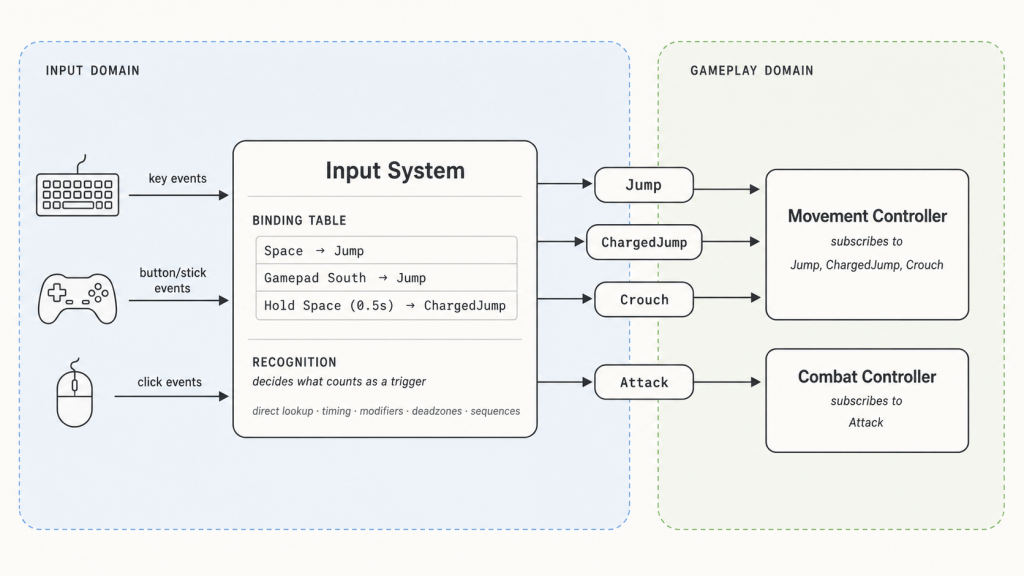
Here’s a concrete walkthrough. Suppose the binding table includes:
- Space → Jump
- Hold Space (0.5s) → ChargedJump
- Gamepad South → Jump
- Left Ctrl → Crouch
- Left Mouse → Attack
The player taps Space briefly. A binding matches; the Jump action is emitted. The Movement Controller, subscribed to Jump, runs its handler. It knows nothing about Space, nothing about timing — only that the player wanted to jump.
The player holds Space for a full second instead. The hold rule eventually fires; the ChargedJump action is emitted; whichever subscriber handles charged jumps responds. Where the hold rule physically lives in the input system isn’t visible to gameplay code.
The player picks up a gamepad and presses South. A different binding row matches; the same Jump action fires. Many-to-one mapping comes for free.
The player rebinds Jump to Enter. One row changes; every subscriber to Jump keeps working without modification.
The flow is strictly one-directional: hardware → input system → actions → consumers. The input system doesn’t know what the actions do; the gameplay code doesn’t know how they got triggered. The action is where they meet.
There’s still one piece missing. So far the binding table is fixed: the same set of bindings is always active. But what an input means in a real game depends on what the player is doing. When a menu opens, pressing Space shouldn’t make the character jump in the world behind it — even though Space → Jump is still sitting in the table. Our current architecture has no way to tell the input system to stop honoring that binding while the menu is open. Capturing that distinction is going to require something we’ve been carefully avoiding: a small backward channel from the gameplay side to the input side.
The dangerous addition
We’ve been avoiding context because it doesn’t fit cleanly into the architecture we’ve been building.
A note on the term first. In input-system parlance, context means which set of bindings is currently active. Most games need more than one. Space → Jump makes sense in the world but not in the pause menu. Escape → Close makes sense in a menu but not while running. The game switches between contexts as the player moves through different modes.
Up to this point, the input system has been strictly upstream. Hardware events come in, actions go out, and nothing flows the other way. That one-directional flow is what made everything else clean: the input system can be developed, tested, and reasoned about without knowing anything about gameplay.
Context breaks that. To know which binding set is in force, the input system has to be told — and the only thing that knows is the gameplay code. The moment we let gameplay tell input which context to use, we’ve opened a backward channel.
And backward channels, once they exist, multiply. Every gameplay component with a reason to mutate input state will do so. Within a few features the input system has a dozen callers reaching in from a dozen directions, and the separation of concerns we worked so hard for is ornamental.
Here’s how that goes wrong.
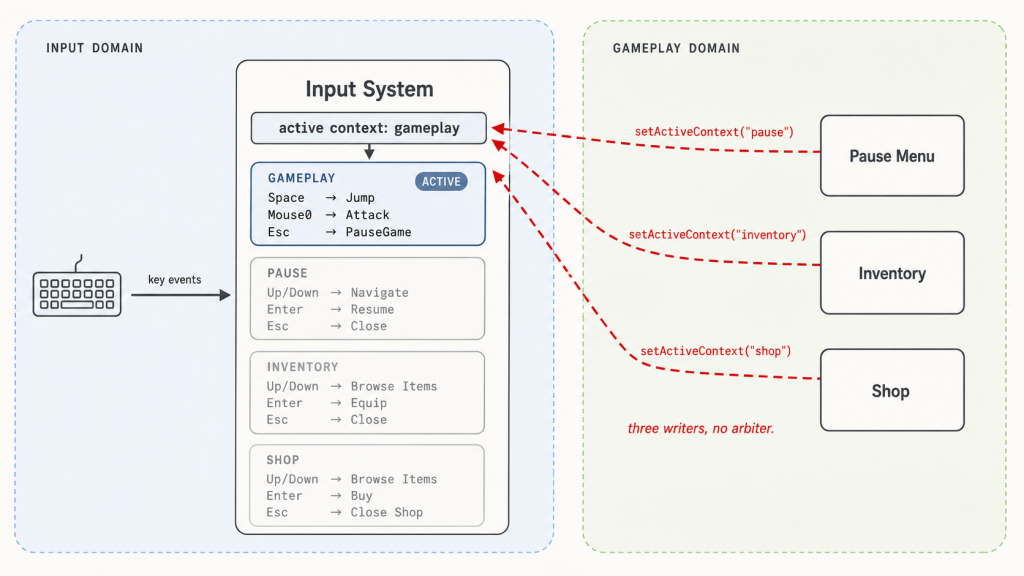
The obvious first move is what every developer reaches for. When the pause menu opens, it calls inputSystem.setActiveContext("pause"). When it closes, it calls setActiveContext("gameplay"). Works perfectly. Ship it.
Then someone adds an inventory. Its open handler calls setActiveContext("inventory"). Its close handler calls setActiveContext("gameplay"). Still works.
Then someone adds a shop. Players can open it from a vendor in the world, or from inside the inventory. The shop’s open handler calls setActiveContext("shop"). The player closes it. What should the active context be now? If they came from the world, gameplay. If they came from the inventory, inventory. The close handler can only hardcode one — let’s say gameplay. Now players who opened the shop from the inventory find themselves dropped into gameplay with the inventory still on screen, and Space starts firing Jump again.
Two components both believed they owned the context. The last one to write won. Same anti-pattern as the implicit state machine, one level up.
The fix is the same fix as before — and at this point in the post, you can probably guess what it is.
Whenever multiple parties want to mutate shared state, the answer is to name the state, give it a single owner, and route every mutation through that owner. We’ve done this twice already: once for the character’s locomotion state (replacing scattered booleans with a single enum), once for the input system’s binding logic (replacing scattered ifs with a single binding table). Now we do it a third time, for the game’s context.
The current context is real state, and real state needs a real home. So we introduce one: a context manager. Its only job is to know what context is currently active, and to be the only thing allowed to tell the input system about it. Consumers don’t talk to the input system anymore — they talk to the context manager. The manager arbitrates, decides what the new active context should be, and forwards exactly one instruction to the input system: “the active context is now X.”
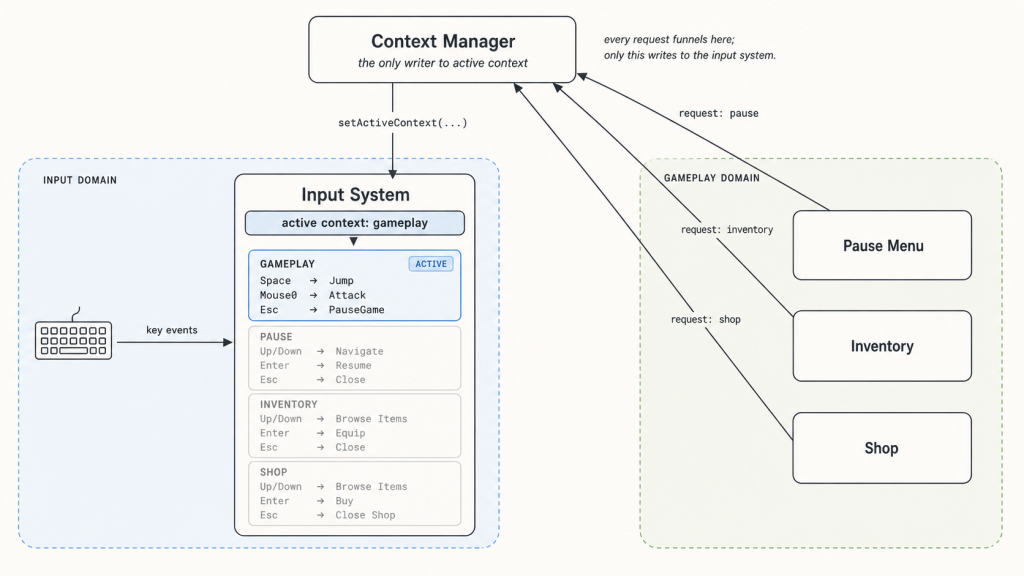
The shape of the manager itself depends on the game. 4 The architectural point we need here is that exactly one manager exists, and it is the only thing the input system listens to.
Easier than the wrong thing
The right thing is always possible. You can write disciplined code, remember every invariant, document every assumption, and produce something correct in any system, no matter how badly designed. So the test of an architecture isn’t whether the right thing is possible in it. The test is whether the right thing is easier than the wrong thing at the moment a tired developer reaches for the keyboard at 4pm on a Friday.
Take the state enum. We didn’t make it impossible to misrepresent the character’s mode — you could pile up flags somewhere else. What we did was make the right thing easier. Adding a new state is typing a name in one place; scattering the mode across half a dozen booleans means actively swimming against the structure of the code.
The binding table did the same for input. Hardcoded if (Input.GetKeyDown(...)) calls still compile — but editing one row of a table beats writing a check in five places, and bypassing the system means deliberately ignoring a piece of architecture that’s right there asking to be used.
The context manager did it for game mode. Components can still reach past it into the input system. They don’t, because going around an arbitrator whose entire job is to stop them is more work than going through it.
In every case, the architecture didn’t enforce correctness. It made correctness the path of least resistance.
The wrong thing was easier than the right thing.
That was the diagnosis every time. Changing the architecture until it stopped being true was the fix.
Once you can see it, the test generalizes to design questions this post never touched. Is the right thing easier than the wrong thing in this system? Ask it, and most of the answers fall out.
That’s the whole argument. Input, action, context — three layers, one principle: build the system that makes the right thing the easy thing.
Further reading
Input system design is book-sized, and what we just walked through is one thread through it — roughly in the order I’d want a beginner to encounter the ideas. What follows is a tour of things we skipped: useful refinements worth knowing, and a few open questions worth chewing on.
A brief tour of Unity’s Input System
If you’re working in Unity, the package called Input System (the modern replacement for the legacy Input.GetKey... API) maps onto the architecture this post described almost one-for-one. The vocabulary is slightly different in places, but the underlying ideas are the same.
- Actions. Same name, same meaning. Named, abstract intents —
Jump,Move,OpenInventory. Your code subscribes to these. - Bindings. Same name, same meaning. Rules that wire hardware controls to actions. A single action can have many bindings — keyboard, gamepad, touchscreen — and Unity treats this as the default case, not the special one.
- Action Maps. This is what Unity calls contexts. An Action Map is a named collection of actions enabled or disabled together — typically
Gameplay,UI,Cutscene, and so on. You switch contexts by enabling one map and disabling the others. This is exactly the role the context manager arbitrates over. - Processors. Value transformations. Things like inverting a stick axis, applying a deadzone, normalizing a vector, or scaling sensitivity. Processors operate on the value of an input — they reshape what comes through, but don’t change when the action fires.
- Interactions. Timing-and-pattern rules. Hold (action fires after the control has been held for some duration), Tap (action fires on a quick press-and-release), Multi-Tap, Slow-Tap, and so on. Interactions are the recognition layer this post described — and Unity attaches them to bindings as decorators, which is one of the architectural choices we noted was possible but not mandatory. 5
Lifecycles: started, performed, canceled
I described actions as if they fire once when the rule is satisfied. In practice, every meaningful input has a lifecycle: it begins, it does something, and it ends. Unity formalizes this with three phases — Started, Performed, Canceled — and most input systems converge on something similar.
- Started. The rule has begun matching. The button went down; the hold timer started.
- Performed. The rule has been satisfied. The hold lasted long enough; the double-tap landed in the window. This is the moment “the action fires” in the simplified model from earlier.
- Canceled. The rule was started but didn’t complete. The button was released early; the double-tap missed its window.
These are useful even for simple actions. Started lets you trigger animations or audio the moment a press begins. Canceled lets you tear those down cleanly when the player changes their mind. Without lifecycles, you end up creating extra named actions — JumpButtonDown, JumpButtonUp, JumpHoldStarted, JumpHoldCanceled — and the action vocabulary doubles or triples for no real gain.
Hierarchical state machines
The state machine we drew had four flat states: standing, jumping, crouching, attacking. That works for an example, but real characters quickly accumulate states with mostly-similar behavior. Imagine adding a swim mode: SwimIdle, SwimMoving, SwimAttacking, SwimDodging. Then a climb mode. Then a mounted mode. As flat siblings of the original states, you end up duplicating most of your transition rules and the state machine sprawls.
A hierarchical state machine lets you nest one state machine inside another. The character has an outer state machine with OnFoot, Swimming, Climbing, Mounted. Inside each, an inner state machine — Idle, Moving, Attacking, Dodging — that’s largely shared in shape but different in detail. Transitions, animations, and rules can be inherited, overridden, or replaced at each layer.
The benefit shows up wherever two state machines are mostly the same with a few critical differences. Locomotion modes (foot/swim/climb) share the idle/moving/attacking shape but differ in physics. Combat stances (sword/bow/spell) share the ready/wind-up/strike/recover shape but differ in timing and reach. A hierarchy lets you describe the shared shape once and customize it where it matters.
The cost is conceptual overhead. Hierarchical state machines come with more vocabulary — entry actions, exit actions, history states, parallel regions — and they’re easier to over-design than to under-design. If you find yourself reaching for one, the test is whether the duplication you’d be eliminating is real structural duplication, or just a few coincidentally-similar transitions.
Open questions to chew on
A few questions the post deliberately didn’t answer. They’re good ones to think through on your own — there are real answers, but the reasoning is what’s worth doing.
Holding a button has a visible state — a bar fills, a charge indicator pulses, a slingshot stretches. Who owns that visual? The input system knows about the timer; the gameplay code knows about the visual. So which side draws the bar? And whichever you pick, what does the other side need to expose so that side can do its job? The question is sharper than it looks — it forces you to decide what counts as “input” once you admit input has a visible duration, not just a moment.
Haptic feedback — vibration, rumble, force feedback. Where does it live in this architecture? It’s tempting to say “it’s just output, that’s not an input concern.” But haptics are usually a response to player input — the controller rumbles when you fire, when you take damage, when you hit a wall. So it lives downstream of actions, but it talks to the same hardware the input came from. Does the input system grow an “output” half? Does gameplay talk directly to the controller? Is there a third actor we haven’t named yet? Pick something and defend it.
Some inputs are events (a key going down). Others are streams (mouse delta, gamepad stick, gyroscope, accelerometer). The architecture in this post is built around discrete actions firing at moments — Jump, Attack, OpenInventory. A continuous stream of values doesn’t obviously fit. Does it become an action that fires constantly? An action that holds a current value the gameplay code polls instead of subscribing to? Something else entirely? The mental model has to bend somewhere — figuring out where it bends, and what that costs, is one of the more useful exercises for understanding what this architecture actually buys you. (A hint: Unity has something called ActionType , you may want to look it up)
Input buffering. Fighting games and Soulslikes accept inputs slightly before they’re allowed — pressing attack 100ms before your recovery animation ends still counts. Where does that buffer live? Is it a property of the action itself, where the action remembers it was started but not consumed? A separate buffering layer between the input system and gameplay? Something the gameplay code does itself, per-character? Each has a different blast radius, and a different answer to who decides how forgiving the game feels.
Action consumption and priority. A pause menu and the world both subscribe to Cancel. The player presses Escape. Both fire — but only one should respond. (Or should both? Or neither, until something arbitrates?) Are actions consumable? Does the first subscriber win? The last? Should subscribers declare a priority? The naïve “everyone subscribes; everyone fires” model breaks the moment two subscribers disagree about what should happen — and the answer interacts in interesting ways with the context manager.
Recording and replay. Sooner or later most games need to record player input and play it back — for replays, esports clips, ghost runs, AI training, deterministic bug repro. What gets recorded? You can capture raw hardware events (faithful, but coupled to the device — change a binding and the replay breaks) or actions (portable across rebinds, but you’ve lost the recognition timing and the device-specific texture of how the player got there). Both are defensible; the architecture has to commit somewhere. Where in the pipeline does the recorder tap in, and what’s the cost of the choice?