Have you ever dreamed about an open-world game where the map wraps around like a real planet? Yeah, me too.
I spent the last few days building an engine for this. Not a sphere placed in a 3D world, but an engine where the sphere is the space. The code is on GitHub.
This post has interactive demos embedded throughout. They work best on a desktop browser with keyboard and mouse.
The Problem with Planet Games
Most games that put you on a planet do the same thing: they embed a sphere in ℝ³ and let you walk on the outside.
The ground on a sphere is curved. Players expect flat ground. So the developer has to apply a bag of tricks to close that gap: recalculate “up” at every point from the surface normal, project objects onto the curved surface to place them, and build custom gravity that pulls toward the center instead of just pointing down. The whole effort is spent making a curved thing feel flat. And anything you’d normally do on a flat surface, like bot pathfinding, now has to account for the curvature too.
But the real problem goes deeper. We can’t talk about the world the way we normally would. Almost all gameplay happens near the surface, and near the surface of a sphere, the ground is flat. That’s how we experience Earth every day: “walk 10 meters north,” “the village is 2 km that way,” “turn left and keep going straight.” We should be able to say things like that when building the game, and have them just be true. But because the engine starts from a sphere in Euclidean space, every flat-ground assumption has to be translated into curved-surface math first.
So what if we built an engine where that flat “earth language” was the native language, and the world still looped? 2D side-scrollers have had looping worlds for decades. The screen is flat, the physics are flat, and the level just wraps when you reach the edge. There’s no hidden curvature making that work. Topologically, it’s S¹ — a flat world that loops — and nobody thinks twice about it. The question is whether we can do the same thing in 3D.
Riemann to the Rescue
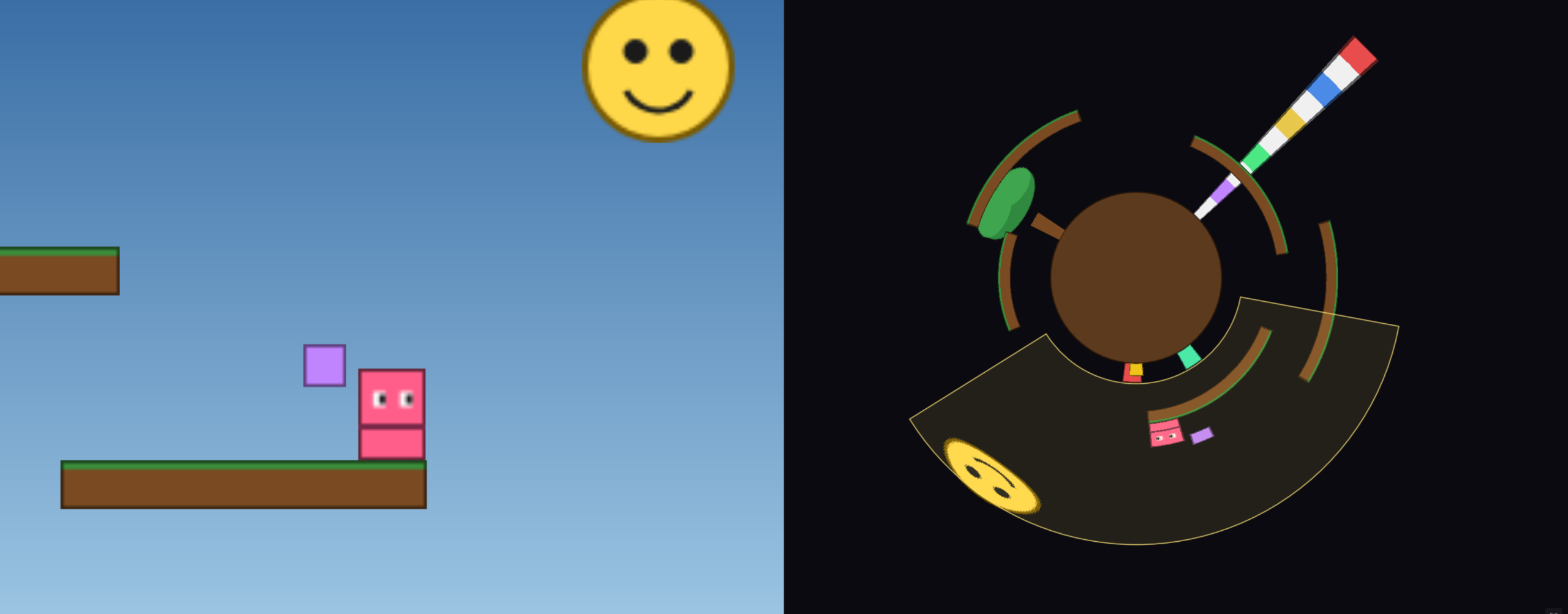
This is the 2D version of the engine that I built as a proof-of-concept. 1 On the left is the world: a flat side-scroller. The ground is flat, physics work the way you’d expect. On the right is the extrinsic embedding — the same world arranged on a circle, so you can see why it loops.
It looks like any other side-scroller. The difference is in how it wraps. A normal scroller wraps by resetting your x-coordinate when you hit the edge. It’s a programming trick. 2 This engine wraps because the world is S¹ × ℝ — a circle (the horizontal axis) crossed with a height line. And the way it’s defined borrows from Riemannian geometry.
Gauss showed that curvature is an intrinsic property — you can measure it without leaving the surface. Riemann took this further and defined geometry entirely through the metric tensor, with no reference to an ambient space. A circle embedded in ℝ² looks curved, but its intrinsic geometry is flat: an inhabitant just experiences a straight line that eventually comes back. The metric is flat, and the looping comes from the topology, not from curvature.
Play around with the demo and you’ll notice a few things.
The ground and platforms are flat horizontal lines on the left, but arcs on the right. The colored pole’s bands are narrower at the base and wider at the top. The floating smiley face is visibly stretched wider than it looks on the left. This is because the embedding maps height to radial distance from the center, so objects further from the surface span a larger arc for the same intrinsic width.
Now try zooming out on the left view (scroll wheel). At some point, you’ll start seeing objects repeat. Keep zooming and they repeat again, and again. These aren’t copies — they’re the same objects, seen multiple times because the world wraps. On a circle, you can reach any point by going the short way, by going the long way, by going all the way around and then some, and so on. Each of those paths is a real line of sight, and the intrinsic view shows all of them. 3
S² × ℝ
Same idea, one dimension up. The world is S² × ℝ — a sphere crossed with a height line. The surface and the vertical axis are completely independent: moving up doesn’t change anything about the surface geometry, and moving along the surface doesn’t change anything about height. On the left is the intrinsic view: flat ground, third-person controls. On the right is the extrinsic embedding on a sphere. Walk around, jump on platforms, try the radius slider. The ground is still perfectly flat. Gravity is just a force in the −h direction — no “pull toward center” logic, no custom gravity system. But this time, making the surface geometry work was quite a bit harder.
The metric on S² is ds² = R²(cos²φ dθ² + dφ²), which has Gaussian curvature K = 1/R². This means Christoffel symbols are nonzero, geodesics are great circles, and parallel transport rotates vectors as they move along the surface.
I started with (θ, φ, β) coordinates, which work fine away from the poles. But the singularity at cos(φ) = 0 isn’t just a numerical inconvenience — walking through a pole means φ reverses, θ jumps by π, β jumps by π, and the update equation divides by zero, all at once. The fix is to drop coordinates entirely and store each entity’s state as an SO(3) matrix — three orthonormal columns representing right, forward, and up. The up vector is the surface normal (position = R·up), and forward is the facing direction tangent to the surface. Movement is rotation: walking forward rotates the frame around the right axis by v·dt/R. Turning rotates around up. Walking through a pole is just another matrix multiply. Parallel transport, which in coordinates requires the manual correction dβ = sinφ·dθ, comes for free: rotating the frame naturally carries the tangent vectors along the surface. The Christoffel symbol machinery is still there, it’s just absorbed into the geometry of SO(3).
That’s the math. Here’s what it looks like in practice.
Try changing the radius with the R slider and look at the horizon. It’s always a perfectly straight horizontal line, no matter how small you make the planet. R = 100, R = 2000, doesn’t matter. This is the intrinsic geometry doing its job — the ground is flat, so the horizon is flat.
Set the view distance to half a lap or less. At this range, you can’t tell you’re on a sphere at all. The world just looks like an infinitely extending flat plane, like Minecraft. There’s no visual cue that it wraps. Now push the view distance past one full lap. Objects start appearing twice — once via the short path, once via the long way around. Keep going and they repeat again. Same phenomenon as the 2D demo, but now it happens in every direction.
On the extrinsic view, you’ll see the same stretching effect from the 2D demo. The pole and the smiley face are narrower at the base and wider at the top. Try the “Walker h” slider to lift the orbiting blocks above the surface — as h increases, they orbit on a visibly larger circle in the extrinsic view, and they look increasingly stretched, for the same reason: the embedding maps intrinsic width to a larger arc at greater radial distance.
Some effects aren’t visible in the demo but follow directly from the geometry. A bullet fired straight ahead follows a great circle. It stays at constant height, traces the full circumference of 2πR, and hits you in the back of the head. On a real planet, that bullet would fly off on a tangent into space — but in S² × ℝ there is no “off the surface,” so horizontal motion follows the surface forever. In a game, this would mean long-range projectiles need no special wrapping logic — the geodesic handles it naturally.
The circumference is 2πR at every height. A plane flying at h = 10km and a person walking on the ground, both moving at the same speed 4 in the same direction, stay directly above each other forever. On a real planet the plane would fall behind (larger orbit = more ground to cover per lap). Here, the product metric keeps the two dimensions independent. h has no effect on surface distances.
And what happens if you dig below h = 0? Mathematically, nothing special. The ℝ in S² × ℝ extends infinitely in both directions — there’s no core, no center, no special point at h = -R. The extrinsic embedding is another story: the position formula is (R + h)·unitDir, so at h < -R the radius goes negative and the embedding folds through the origin. I didn't bother implementing that because it stops making geometric sense in ℝ³. But intrinsically, there's nothing stopping you.
Earth Language
The whole motivation for this engine was to let developers work in flat terms on a world that loops. So does it deliver?
Yes, but the engine needs to expose two kinds of coordinates.
The first kind is global. On a sphere, latitude, longitude, and height give durable names to places — a designer puts a tower at 43° north, 79° west, twenty meters up; a save file stores where a dropped sword is. And cardinal directions have absolute meaning: “walk 10 meters north” is unambiguous almost anywhere on the planet. The everyday language from the first section — “the village is 2 km that way,” “turn left and keep going straight” — just works.
The second kind is local. In Unity or Unreal, a developer may place an object at (3, 0, 5) relative to the world origin. A planet doesn’t have a single natural origin — every point on a sphere is equivalent. So the engine should let you place origins on the ground wherever you need them: a building, the center of a town, a spawn point. Then work relative to that origin in ordinary Euclidean terms. Place an object at (3, 2, 10), cast a ray from (0, 1, 0) to (0, 1, 20), etc. Build a room or a combat encounter without thinking in spherical coordinates. Same workflow as any flat engine — the only difference is that the origin is placed, not global.
Internally, the engine represents positions and frames as SO(3) matrices — the same way Unity uses quaternions for rotations. Developers don’t write quaternion algebra; they write Euler angles. Here, developers wouldn’t write SO(3); they’d write in lat/lon, local offsets, and heights. The translation between human-readable coordinates and SO(3) is straightforward once you have the underlying geometry right. I haven’t built this layer yet, but I would if I ever turn this into a real engine.
Bonus: Möbius × ℝ
The infrastructure isn’t limited to spheres. The design pattern carries over: define the metric, the topology, and the identification rules, and the dual-view architecture adapts. As a proof of concept, here’s a Möbius strip.
The Möbius strip is intrinsically flat — zero curvature, like S¹. But it’s non-orientable: the identification rule is (u, v) ~ (u + L, −v). Walk one lap and everything flips left-right. You’ll see objects in the distance appear mirrored. Walk another lap and they’re back to normal. The topological period is 2L, not L.
The demo has two modes you can toggle. In Mode B, the full deck transformation applies — h flips along with v, so (u, v, h) ~ (u + L, −v, −h). Odd-lap copies of objects appear flipped vertically, as if seen from the other face of the strip. The extrinsic ribbon in ℝ³ has two faces, so the two views match cleanly. In Mode A, h stays constant. Objects at odd-lap distances are just mirrored, not flipped. This is more natural, because the intrinsic world doesn’t have a front or back face — that distinction only exists in the embedding. It’s probably more useful for a game, too. But it has no faithful representation in ℝ³, so the extrinsic view uses a greyscale shader to indicate which sheet you’re on.
S² × ℝ, Möbius × ℝ — these are two manifolds, but the framework is the same. Any manifold with a well-defined metric and identification rules can plug into this architecture. That said, the point of this engine isn’t to showcase exotic geometry. There are plenty of non-Euclidean games out there built around the novelty of “look how weird this is.” The planet engine is the opposite — it’s a practical tool with clear tradeoffs.
You get flat ground, flat physics, and flat code. Pathfinding, collision, object placement — all plain Euclidean, same as any flat-world engine. The world wraps seamlessly in every direction with no edge and no seam. You give up the look of a real planet. There’s no horizon curving away, no small-planet feel. The world looks like Minecraft, not Outer Wilds. And the product metric means altitude doesn’t affect circumference — a detail that’s geometrically unlike a real sphere.
Whether that tradeoff works depends on the game. But for any project that wants a finite, seamless world where the developer just writes flat code — this is a way to build it where the math actually works.