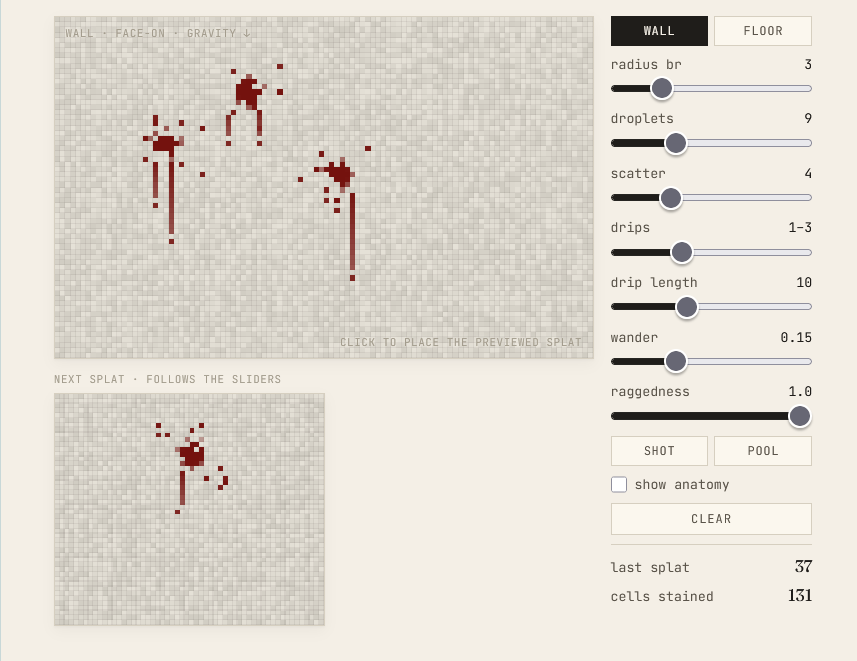
This post has an interactive demo embedded. It works best on a desktop browser.
This is a procedural generator for blood stains in pixel art. The small pane under the surface is a live preview of the current parameters; click anywhere on the surface to splat. radius is the blob radius — 3 reads as a fresh hit, 8 as a pooled stain, and the two presets set those looks. Drips only happen on walls, so the floor view skips them. The show anatomy toggle tints each cell by which part of the algorithm placed it.
The generator is about forty lines, and it drops into anything cell-shaped: a sprite, a tilemap, a texture you’re compositing at runtime.
Everything below works on one data structure: a grid where each cell holds a coverage value from 0 to 1. Zero is clean, 1 is fully soaked, and rendering is just a tint toward dark red scaled by coverage. The algorithm’s whole job is deciding which cells get how much.
A Splat Has an Anatomy
Look at any reference for high-energy impact spatter (forensics pages are the motherlode, if you can stomach them) and the same three parts show up:
- A central blob — the main mass, dense in the middle, ragged at the rim.
- Outlier droplets — separate specks scattered past the blob, where smaller drops flew farther.
- On vertical surfaces, drips — thin streaks where the liquid ran down under gravity, often ending in a detached drop that fell the rest of the way.
The generator stamps all three, in that order.
Down Is the Only Direction That Matters
The pattern is stamped at offsets (du, dv) from the impact cell, and the one thing the algorithm needs to know about the surface is that +dv points down. On a wall seen face-on, down is where drips will run. On a floor seen top-down there is no downhill, so the drip stage is skipped and the rest of the pattern works unchanged.
That’s the entire surface awareness. No normals, no orientation cases — pick which way is down, or decide there isn’t one.
The Blob
The blob is a disc with a probabilistic edge:
for (let dv = -br; dv <= br; dv++)
  for (let du = -br; du <= br; du++) {
    const dist = Math.sqrt(du * du + dv * dv);
    const edge = 1 - dist / (br + 0.7);
    if (edge <= 0 || Math.random() > edge * 1.25 + 0.12) continue;
    deposit(du, dv, clamp01(edge * 2.5));
  }
edge falls from 1 at the centre to 0 at the rim, and it drives two separate decisions. First, whether the cell gets stained at all: the acceptance probability edge * 1.25 + 0.12 means the core always passes and the rim survives only sometimes, which is where the ragged outline comes from. Second, how much coverage the cell gets: edge * 2.5, clamped to 1, keeps roughly the inner 60% of the disc fully solid, with feathering confined to the outer ring.
My first attempt faded coverage linearly across the whole radius, and the result read as airbrush. Blood is opaque. A real stain is solid almost everywhere and soft only at its edge.
The Droplets
const drops = 6 + randInt(0, 6);
for (let i = 0; i < drops; i++) {
  const du = randInt(-br - 4, br + 4), dv = randInt(-br - 3, br + 4);
  if (Math.abs(du) < br && Math.abs(dv) < br) continue;
  deposit(du, dv, 0.85 + 0.15 * Math.random());
}
Six to twelve single-cell specks, thrown uniformly into a box a few cells larger than the blob, with anything that lands inside the blob’s own box rejected. Droplets belong in the gap past the main mass, and a droplet on top of the blob would be invisible anyway.
They get near-full coverage for the same reason the blob’s interior does: a faint lone cell looks like noise, a solid one looks like a drop that landed there.
The Drips
Drips are wall-only, and they carry most of the effect:
const nDrips = 1 + randInt(0, 2);
for (let d = 0; d < nDrips; d++) {
  let du = randInt(-br, br);
  const len = 5 + randInt(0, 9);
  for (let k = 1; k <= len; k++) {
    deposit(du, br + k, lerp(1.0, 0.55, k / len));
    if (Math.random() < 0.15) du += randInt(-1, 1);
  }
  deposit(du, br + len + 2, 0.85);
}
One to three streaks start under the blob and run straight down. Coverage fades from solid toward the tip, but only down to 0.55 — a drip thins as it runs out of liquid, it doesn’t evaporate. Each cell has a 15% chance to shift the streak sideways by one, which turns a ruler-straight line into the slightly wavering track a run actually leaves.
Then, two cells below where the streak ends, one detached solid drop: the run broke off and fell. It’s a single deposit call, and without it the whole pattern reads as painted on.
Depositing
deposit itself merges by max, not by addition:
if (cov > blood[cell]) blood[cell] = cov;Overlapping splats union instead of accumulating. Stamp the same spot five times and the stain grows and consolidates the way a wet patch would, instead of clipping into a uniform saturated slab.
If your surface has holes or edges — a sprite with transparency, a tilemap with gaps — add one guard: only deposit on cells that exist. Marks that fly past an edge should vanish, not wrap or smear along it.
What Makes It Work
If you go back up and set raggedness and wander to zero, the output turns mechanical: clean discs with straight tails. The structure of the pattern was never random. Blob, droplets, drips land in the same arrangement every time, and all the noise lives at the boundaries — the edge acceptance, the scatter, the sideways wander. That split, a deterministic skeleton with noisy edges, is most of what lets forty lines pass for something organic.
Demo source: github.com/CheukHoYun/PixelBloodPatterns.
One Comment