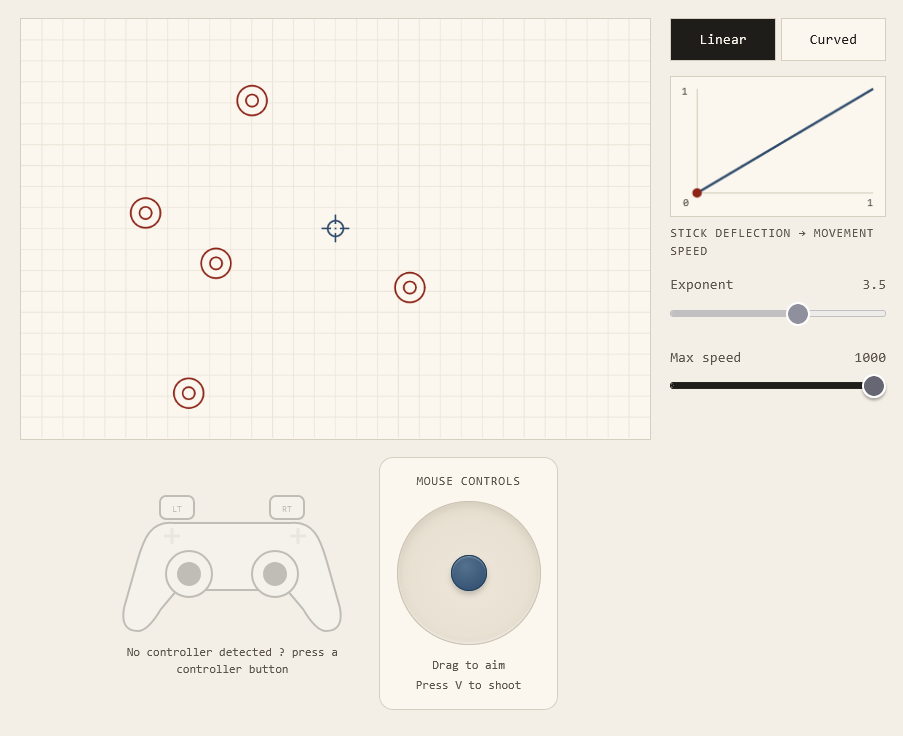
Suppose we want to move a cursor using a joystick. A straightforward implementation is to make the cursor’s speed proportional to how far the stick is pushed: halfway gives half speed, and all the way gives full speed. This lets the user reach any speed between zero and the maximum.
Try using it to hit the targets below.1
With a low maximum speed, aiming is comfortable, but crossing the screen takes forever. Raising the maximum makes the cursor quicker to move around, though now it’s easy to overshoot a target. Even with all those speeds available, finding a useful setting is awkward.
Making room for small adjustments
A joystick has very little travel. Increasing the maximum speed packs a larger range of speeds into that same distance, so the low speeds needed for aiming occupy a smaller region near the centre. To move slowly, you have to hold the stick inside that region.
In code, we can describe an arbitrarily small adjustment to the input value, up to the limits of its numerical representation. With a thumb, there’s a practical limit to how small a movement we can reliably make. Once the aiming region becomes too narrow, telling the user to push the stick a little less isn’t much help.2
Now switch the demo to the curved response.3
More of the stick’s travel produces low speeds, and the cursor approaches its maximum speed near the outer edge. This gives your thumb more room for fine adjustments while keeping fast movement available. The hardware and numerical precision are unchanged; we’ve redistributed the speeds across the stick’s travel.
The cost is less room to distinguish between high speeds. That’s usually a reasonable trade-off here: when crossing the screen, you probably don’t care much whether the cursor moves fast or slightly faster. Near a small target, a similar difference in speed can make it difficult to stop where you intended.
Timing a button press
The same difficulty shows up when moving a selection around a grid with a D-pad. Suppose pressing a direction moves one cell, and holding it repeats the movement at a constant rate.
Try moving just one cell, then crossing the grid. With a high repeat rate, you have to release quickly to avoid moving twice. A slower rate makes single steps comfortable, but the wait becomes tedious when you have a long way to go.
Here, the constraint is how accurately we can time a release, rather than how finely we can move a thumb. There’s also a limit to how long we’re willing to wait. Using one repeat rate for the entire hold forces a compromise between the time allowed for a single step and the time needed to cross the grid.
Switch to the stepped version.
The first press moves immediately, followed by a pause before repetition begins. Repetition starts slowly and then speeds up if you keep holding. You have time to release after one step, without having to wait through that same pause for every subsequent step.4
This works much like the joystick curve. We give fine adjustments more of the available range—in this case, time—and use the remainder for faster movement.
How specific is the intention?
We could also increase the repeat speed smoothly. To decide whether that would help, it’s worth considering what the user is trying to express by holding the button.
Often, they want to move one cell, move a little farther, or get across the grid. They aren’t choosing an exact speed by timing the hold. With a joystick, too, the intention may be closer to “slow,” “faster,” or “fasterrrr.” The user watches the movement and adjusts as they go.
So there are two different reasons why extra numerical precision might not help. A person may know exactly what they want but be unable to produce the input accurately enough. Or they may have no particular value in mind at all: several speeds would serve equally well, provided they can make adjustments comfortably. In the second case, there isn’t an exact intention for the interface to recover.
For the grid, a few repeat speeds can suit those broad intentions. A short press gives a single step; a longer hold allows repeated movement, then fast travel. Smooth acceleration may work better in another context, but its mathematical continuity alone tells us little about how easy it will be to use.
This doesn’t require us to reduce every control to a few fixed settings. The joystick can remain continuous while giving more room to the speeds that need careful control. What matters is whether the distinctions available to the user are useful for the task, and whether they can make them reliably.
Why start with linear?
A linear mapping is easy to implement and explain, so it often feels like the obvious default. But it’s still a design choice, and we should question whether it suits the task just as we would any other mapping.
Beyond controllers
The same issue appears in sliders that squeeze useful values into a few pixels, timelines that make individual frames hard to select, and handles too small to grab comfortably. Depending on the task, a response curve, zooming, fine-adjustment mode or larger target may help more than additional numerical precision.
Usable precision depends on what people can reliably control and how much accuracy the task requires. The changes in these demos leave the decisions to the user while making them easier to carry out.